
Introduction
In the world of Generative AI and Large Language Models (LLMs), OLAMA servers have gained popularity for deploying and interacting with AI models in real-time. However, a concerning trend has emerged — an increasing number of OLAMA servers are exposed to the public Internet without proper security controls.
In this blog, we will explore why so many OLAMA servers are publicly accessible, the associated cybersecurity risks, and how to implement basic authentication using NGINX as a quick mitigation measure. For a hands-on demonstration of setting up an OLAMA server in Azure and exposing it to the Internet, check out my Udemy course on Gen AI Cybersecurity.
Setting Up an OLAMA Server in the Cloud (Lab Setup Overview)
Before diving into the mitigation, let’s briefly outline the lab setup demonstrated in the course. This setup can be easily replicated using a free Azure or AWS trial account to practice cybersecurity exercises. You can deploy an OLAMA server, expose it to the public Internet, and observe how it can be accessed without authentication.
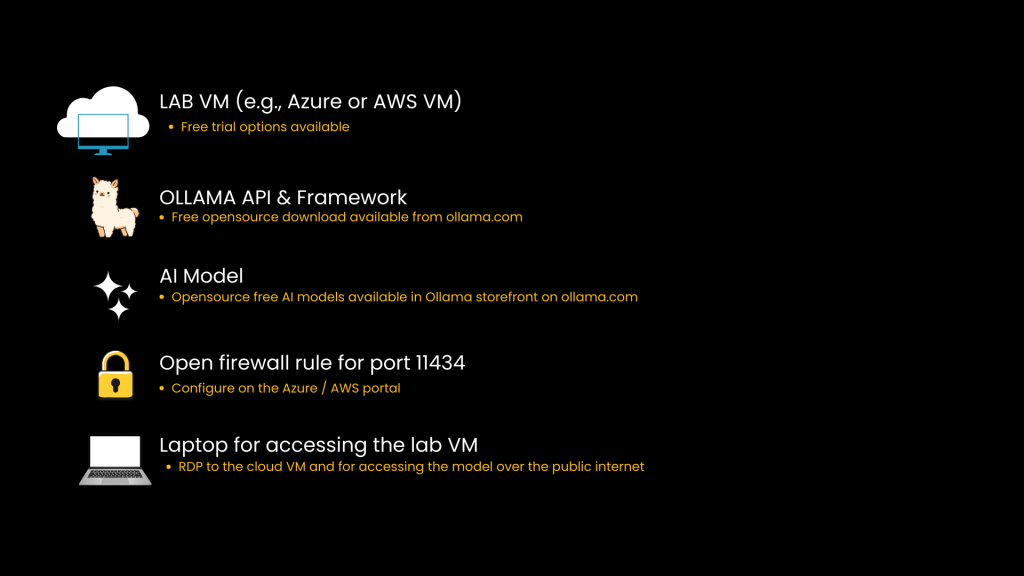
If you’d like to try this out yourself, you can set up your own OLAMA server in a cloud environment and simulate the exposure scenario. Download the lab setup guide below to walk through the exact steps used to expose the OLAMA API to the public Internet and observe the associated security risks.
Download OLAMA Exposure Lab Setup Guide
This lab setup demonstrates how easy it is to accidentally expose a server without authentication.
Real-World Evidence of OLAMA Exposure (Shodan Scan Analysis)
To illustrate that this is not just a hypothetical risk but something you encounter as real scenario, I conducted a scan from my lab box using a simple Shodan query in April 2025. The scan revealed over 2000 OLAMA servers accessible over the Internet.
Now, it is important to note that not all of these servers are necessarily exposed without authentication. However, during my testing, I attempted to connect to a few of these servers and found that several were indeed accessible without any authentication.
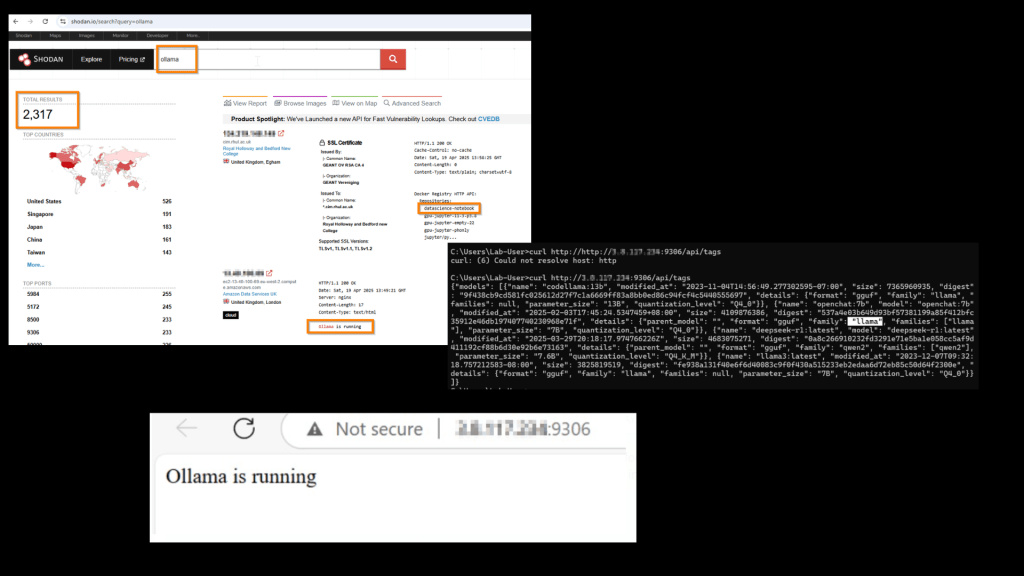
For security and ethical reasons, I have masked the IP addresses in the screenshots, but the point remains — these servers allowed unrestricted access to OLAMA models.
This scenario highlights the real-world implications of improperly secured OLAMA servers:
- Unauthorized access to AI models.
- Potential data leakage through exposed prompts.
- Prompt manipulation and unauthorized command execution.
Next question is, Why So Many OLAMA Servers Are Exposed?
Why are so many developers intentionally or unintentionally exposing these servers?
- Ease of Remote Access: Developers often expose OLAMA servers to the Internet to access them remotely without the added complexity of setting up SSH or RDP sessions. Direct access via public IP is faster and more convenient.
- Collaboration and Testing: When working in distributed teams, exposing OLAMA servers allows multiple developers to interact with the model simultaneously, speeding up collaboration.
- Integration with External APIs: Publicly accessible servers make it easier to integrate with external APIs for testing and prototyping. With a public endpoint, developers can quickly connect the OLAMA server to other tools and services.
- Convenience Over Security: Setting up a public-facing server with tools like ngrok requires minimal effort, making it an attractive option for quick testing and demonstrations. However, such setups often lack authentication and encryption, leaving them vulnerable.
- Developer Knowledge Gap: Most developers working with OLAMA are not from a cybersecurity background. When you search for phrases like “Expose your local OLAMA server to the Internet,” you will find numerous tutorials suggesting tools like ngrok to achieve this quickly. However, very few of these posts emphasize the cybersecurity risks associated with public exposure.
- Lack of Monitoring and Oversight: Once exposed, many of these servers remain accessible indefinitely due to poor monitoring and misconfigurations in firewall rules or network security groups (NSGs).
This scenario underscores a significant knowledge gap — while developers may be skilled in AI model development and integration, many are unaware of the security implications of exposing these endpoints to the public Internet.
While these practices may make OLAMA servers easily accessible for development and testing, they also open the door to potential exploitation. Fortunately, mitigating this exposure is straightforward.
Let’s see how to do it.
Basic Mitigation Using NGINX and Authentication
Now that we have explored why so many OLAMA servers are exposed to the Internet, let’s look at a simple yet effective mitigation technique — implementing basic authentication using NGINX.
If you have already set up the lab environment following the instructions earlier in this post and would like to get hands-on with the mitigation steps, you can now proceed with the following implementation. This exercise will show how to secure the OLAMA server by placing NGINX as a reverse proxy in front of it and enforcing basic authentication.
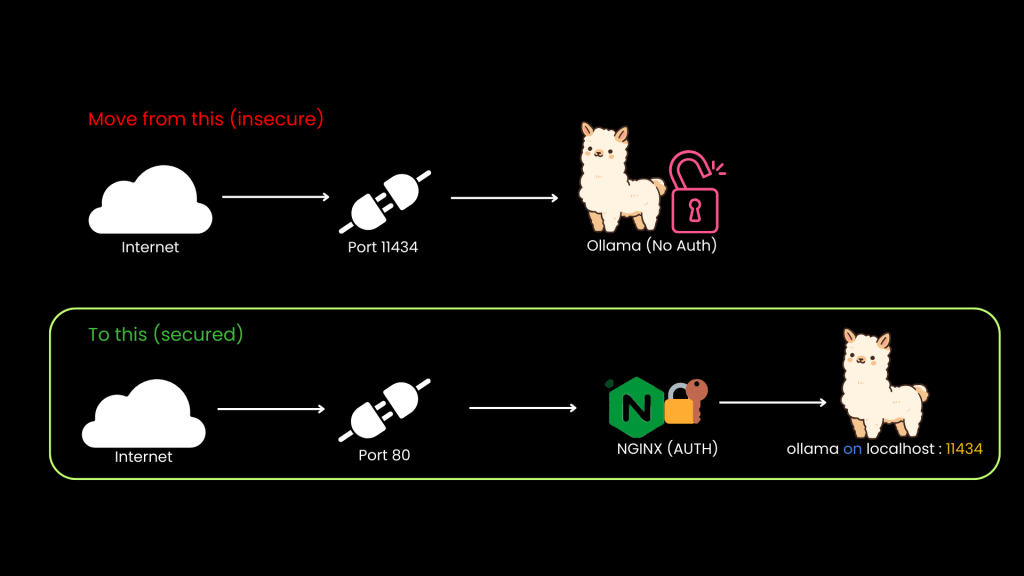
Once you’ve explored the exposure scenario, the next step is to secure your OLAMA server. This guide walks you through implementing NGINX as a reverse proxy with basic authentication to prevent unauthorized access. Download the lab guide below and follow along to apply this mitigation in your own setup.
Download OLAMA Security Lab Guide (NGINX + Auth)
Conclusion:
By using NGINX as a reverse proxy and enabling authentication, you significantly reduce the attack surface of your exposed OLAMA APIs. This setup should be a baseline for any production or public-facing environments.
Now, implementing basic authentication is a critical first step, but additional measures should also be considered:
- SSL/TLS Encryption: Encrypt traffic to prevent data interception.
- API Key Authentication: Replace basic authentication with API keys for more granular control.
- IP Whitelisting: Restrict access to specific IP addresses.
- Rate Limiting: Prevent abuse by limiting the number of requests per minute.
- Monitoring and Alerts: Use tools like Azure Monitor to detect unauthorized access attempts.
One Mitigation to Rule Them All
Implementing basic authentication using NGINX may seem like a simple step, but it significantly reduces the attack surface of an exposed OLAMA server. Without authentication, the OLAMA model is left vulnerable to a range of risks

By placing NGINX in front of the OLAMA server and enforcing basic authentication, we effectively mitigate several key risks outlined in the OWASP 2025
Conclusion and Next Steps
OLAMA servers are becoming increasingly popular for deploying AI models, but their exposure to the public Internet without proper security controls presents serious risks. In this blog, we discussed why so many OLAMA servers are exposed, how basic authentication using NGINX can mitigate these risks, and OWASP 2025 risks.
In the next part 5 of this blog series, we will shift our focus to MITRE Atlas, a framework specifically designed for AI cybersecurity. We will also dive into a real-world case study involving OpenAI vs. DeepSeek.
Continue to Part 5: Mapping AI Attacks with MITRE Atlas: The OpenAI vs. DeepSeek Case Study

 Simone's cybersecurity
Leave a comment